Showing posts with label oracle webcenter. Show all posts

Tuesday, July 8, 2014

Omniture tagging with Oracle WebCenter / ADF pages


In this post we will see how to do omniture tagging with Oracle WebCenter  portal pages. Omniture is an industry leading reporting service which is primarily used by enterprises to track user behavior across custom portals. 

Adobe Omniture Analytics tagging is done can be done on various client actions such a loading a page, clicking on a button or even hovering on a text. The tagging is done through a standard omniture javascript library called s_code.js

We need to include the s_code js file as a resource in our pagetemplate and subsequently use the s variable exposed in the file in utility tagging methods. s_code.js file looks something like this and you can get the actual version from Adobe product team once you get access to setup account.


Omniture global configuration properties

We should have these properties configured from database and depending on environment variables.
  1. s_account
  2. s.visitorNamespace
  3. s.trackingServer
  4. s.trackingServerSecure

1
2
3
4
5
6
7
8
9
10
11
12
13
14
15
16
17
/* SiteCatalyst code version: H.25.3.
Copyright 1996-2012 Adobe, Inc. All Rights Reserved
More info available at http://www.omniture.com */
/************************ ADDITIONAL FEATURES ************************
     Plugins
*/

var s_account="xyz-dev"
var s=s_gi(s_account);

/* WARNING: Changing any of the below variables will cause drastic
changes to how your visitor data is collected.  Changes should only be
made when instructed to do so by your account manager.*/

s.visitorNamespace="xyz"
s.trackingServer="track.xyz.com"
s.trackingServerSecure="strack.xyz.com"


Apart from the global variables - omniture requires the pages to define the type of event ( or event name), custom properties and variables. Defining these variables help reporting and segregating the event types and values.

We create a JavaScript method to push event to omniture .


1
2
3
4
5
6
7
8
9
10
11
function tagLinkClick(event) {
    var eventSource = event.getSource();
    var linkName = eventSource.getText();
    var eventName = eventSource.getProperty("eventName");
 s.eVar1 = linkName;
 s.prop1 = linkName;
 s.linkTrackVars = 'eVar1,prop1,events';
 s.linkTrackEvents = eventName;
 s.events = eventName;
 s.tl(this, 'o', 'Click Me');
}


Capturing client events

Last and the easiest step is to call the tagLinkClick javascript method on link click.

1
2
3
4
5
 <af:commandLink text="#{bundle.CLICK_ME}"
  id="cl1" >
 <af:clientAttribute name="eventName" value="eventX"/>
 <af:clientListener method="tagLinkClick" type="action"/>                  
</af:commandLink>


You can then login to omniture account and see the real time reports. Please let me know what you think about the approach. Any comments welcomed.


Monday, June 30, 2014

ADF: jQuery Auto Suggest Implementation


Oracle 11gIn this post we will see how to integrate the one of the jquery's famous plugins, the ui autosuggest component with an Oracle Webcenter application using ADF faces. This implementation assumes that the requirements around the autosuggest doesn't meet the requirements of the af:autoSuggestBehavior. So lets first discuss why is the out of box auto suggest behaviour in behavior in adf not that desirable.


Cases where af:autoSuggestBehavior is useful

  1. If you have a large complex dataset ( in tunes of +5000 objects)
  2. If the performance / experience of the autosuggest is not a concern

Cases where custom implementation is useful

  1. The autoSuggestBehavior is not a "client only" side implementation so every change in the value triggers an expensive backend call even if there is a static list of values.
  2. Not every time we require to fetch data from backing bean, there are times and I believe for most of the cases we already know the data for which we are applying autoSuggest.
  3. The lack of flexibility to add custom behavior to suggested output is difficult.


So lets build our awesome autosuggest. Assume we have a requirement of auto-suggesting the user from a list of countries. Here's the steps

Step 1 : Add required libraries to our template


Libraries required:
  1. Add jquery core library, if not present already
  2. Add jquery ui custom library ( including the autosuggest plugin )
  3. Also we need GSON jar in classpath ( optional ). Its useful to flush out JSON in proper format

1
2
<af:resource type="javascript" source="/js/jquery-1.11.0.min.js"/>
<af:resource type="javascript" source="/js/jquery-ui-1.10.1.custom.min.js"/>

Step 2: Add a clientListener

The clientListener will fire a client event on focus to a javascript method suggestContries

1
2
3
4
5
6
<af:inputText label="#{bundle.COUNTRIES}" id="it1"
  clientComponent="true" styleClass="countriesBox"
  value="#{myBean.country}"
  immediate="false">
 <af:clientListener method="suggestCountries" type="focus"/>
</af:inputText>


Step 3: Add a method in backing bean


Lets create a method in our backing bean to initialize the data for autosuggest. The method flushes out javascript variable data to the client.The flushed out data contains the list of countries in JSON format. On executing the method we get the JSON string in a JS variable called countriesJS


1
2
3
4
5
6
7
8
9
10
11
12
13
14
15
16
17
18
19
20
21
22
23
24
25
26
27
28
29
30
31
32
33
34
35
public void getCountriesJSON() {
 
 StringBuilder sb1 = new StringBuilder();
 try {
  /*
  * Get all countries:
  */
  //TODO: replace retrieveCountries method to get the set of CountryData objects
  Set<CountryData> countries = retrieveCountries();
  // create an instance of JsonArray
  JsonArray countriesJsonArray = new JsonArray();           
  sb1.append(" countriesJS=");
  Iterator<CountryData> iter = countries.iterator();

  while (iter.hasNext()) {
   CountryData countryData = iter.next();
   JsonObject countryDataObjJson = new JsonObject();

   countryDataObjJson.addProperty("label", countryData.getCountryName());
   countryDataObjJson.addProperty("value", countryData.getCountryCode().trim());

   countriesJsonArray.add(countryDataObjJson);
   }


  sb1.append(countriesJsonArray.toString());

 } catch (Exception e) {
  e.printStackTrace();
 }
 /*
  * Utility method to add the product json object to client page
  */
 addScriptOnRequest(sb1.toString());
}


Utlity method to add script on request:


1
2
3
4
5
6
public static void addScriptOnRequest(String script) {
 FacesContext context = FacesContext.getCurrentInstance();
 ExtendedRenderKitService erks = 
 Service.getRenderKitService(context, ExtendedRenderKitService.class);
 erks.addScript(context, script);
}

Step 4: Get the data on page load


Now lets add the following code to the page where you have the autosuggest input box. This piece of code will call getCountriesJSON method in your backing bean and load the JSON data on the client.


1
2
3
4
<af:document id="d1" title="#{bundle.MY_COUNTRIES}">
 <af:clientListener type="load" method="loadCountriesOnLoad"/>
 <af:serverListener type="loadCountriesEvt" method="#{myBean.getCountriesJSON}"/>
</af:document>


Add loadCountriesOnLoad Javascript method


1
2
3
4
5
6
 function loadCountriesOnLoad(evt)
{
 var customEvent = new AdfCustomEvent(evt.getSource(),"loadCountriesEvt",{}, true); 
 customEvent.preventUserInput();
 customEvent.queue(true);
}


So when page loads we will have the countriesJS is assigned to the following JSON


1
2
3
4
[
    {"label":"Afghanistan", "value":"AFG"}, 
    {"label":"Albania", "value":"ALB"}
]


Step 5: Wiring everything up


We will write the final JavaScript method mentioned on the onFocus event mentioned in Step 1
 - suggestCountries


1
2
3
4
5
6
7
8
9
10
11
12
13
14
function suggestCountries(evt) {
    var src = document.getElementById(evt.getSource().getClientId() + '::content');
    countriesComp = $(src).autocomplete( {
        "source" : countriesJS, "minLength" : 2,autoFocus: false,
        select : function (event, ui) {
           
        }
    }).autocomplete( "instance" )._renderItem = function( ul, item ) {
      return $( "<li>" )
        .append( "<a>" + item.label + "<br>" + item.value + "</a>" )
        .appendTo( ul );
    };
    
}


so here you go, we have the all client side auto suggest implemented !!! Please let me know what you think about the approach.


Thursday, June 26, 2014

JDeveloper and its confusing Extension versions

Extensions for JDeveloper are synonymous with plugins for Eclipse only that the former is tied to Oracle Fusion Middleware Products. There are number of fusion middleware products and these products have there own versions, needless to say not all product versions get served with only a single JDeveloper version.

We take an example of Oracle WebCenter Extensions - recently WebCenter Portal PS7 got released, hurray ! excited ! anyways coming back to point - PS7 was released with extension version of 11.1.1.8 and logically ( as well as historically ) you would have a JDeveloper 11.1.1.8 but No ! - you only see a 11.1.1.7 version ??

Now if you are like me then you go to Google and check if  JDeveloper 11.1.1.7 supports WebCenter Extensions 11.1.1.8 and you would be lucky enough to find this great table from JDeveloper' Extensions and a comment from andrejus. Else just follow my que and download JDeveloper from here

VersionRequirementsLinks


11.1.1.8.0.130707.1955oracle.studio (min=11.1.1.7.40.64.93, max=11.1.1.7.999)
oracle.j2ee (min=11.1.1.7.40.64.93, max=11.1.1.7.999)
Download
11.1.1.8.0.130926.1405oracle.studio (min=11.1.1.7.40.64.93, max=11.1.1.7.999)
oracle.j2ee (min=11.1.1.7.40.64.93, max=11.1.1.7.999)
Download
11.1.1.8.0.131217.0204oracle.studio (min=11.1.1.7.40.64.93, max=11.1.1.7.999)
oracle.j2ee (min=11.1.1.7.40.64.93, max=11.1.1.7.999)
Download
11.1.1.8.0.140404.0207oracle.studio (min=11.1.1.7.40.64.93, max=11.1.1.7.999)
oracle.j2ee (min=11.1.1.7.40.64.93, max=11.1.1.7.999)
Download

Now thats a find don't you think :)

Abhinandan Panda
Happy Me ! BTW, I am the one at back

Tuesday, June 24, 2014

ADF : Handling browser back button

One of the most annoying side effects of doing a PPR request or matter of fact an AJAX request is the inability of the user to go back to previous transaction using browser back button. This is a common pitfall and there are number of ways to deal with it.


Case Study:
Lets assume we have 3 page fragments (jsff) in a bounded task flow and "main.jspx" where task flow is imported and a "launch.jspx" from which we trigger the new page with TF. When the user goes from step 1 to step 3 through step 2 and does a back button, the user is redirected to "launch.jspx" instead of "main.jspx" ( step 2)


Ways to handle browser back button

  1. Simplest - Avoid using bounded task flow ( Not recommended ) -  Now ! this may sound as a non - solution and to most part of it is correct ! but for specific user stories it could make sense. For example, in the above scenario we could use 3 different task flows for each of the fragments and use af:goLinks to navigate from one page to the other by keeping the data in session. This could be a solution when reusing task flow is not really a concern.
  2. Using session variable and servlet filter - We create a bounded task flow with session variable (currentStep = 0) as the input to each step, this is to track the user's current step. 
    • If the user is in step 3 then we set currentStep = 3 and set the value in session. 
    • When the user clicks on back button we check if the request is coming from "launch.jspx" and the currentStep != 0 then go to "main.jspx" with currentStep = currentStep  - 1
    • Once we have the Task Flow triggered through "main.jspx" - we check the value of currentStep  and show the user the requested fragment
  3. Using session variable and PagePhaseListener  ( Recommended )- We follow the same steps as above but instead of a filter we use a PagePhaseListener  to capture the back button request to "launch.jspx".
  4. There is an excellent article on "How To Handle Web Browser Buttons in ADF/WebCenter Applications" by Andrejus who provides an additional approach.

Preventing request caching on browser back button

One more catch with the above implementation logic is to get the request to come to server when user clicks on back button as browser tend to cache the resources.

To prevent it browser caching:


package com.example;  
 import javax.faces.context.FacesContext;  
 import javax.faces.event.PhaseEvent;  
 import javax.faces.event.PhaseId;  
 import javax.faces.event.PhaseListener;  
 import javax.servlet.http.HttpServletResponse;  
 public class PagePhasehaseListener implements PhaseListener  
 {  
   public PhaseId getPhaseId()  
   {  
     return PhaseId.RENDER_RESPONSE;  
   }  
   public void afterPhase(PhaseEvent event)  
   {  
   }  
   public void beforePhase(PhaseEvent event)  
   {  
     FacesContext facesContext = event.getFacesContext();  
     HttpServletResponse response = (HttpServletResponse) facesContext  
         .getExternalContext().getResponse();  
     response.addHeader("Pragma", "no-cache");  
     response.addHeader("Expires", "Wed, 1 Dec 2012 01:00:00 GMT");  
     response.addHeader("Cache-Control", "no-cache");  
     response.addHeader("Cache-Control", "no-store");  
     response.addHeader("Cache-Control", "must-revalidate");  
   }  
 }  

ADF: Optimize Read-Only Queries (for caching)

Consider you have a list of items which you show to the user regularly, be it in a table or a listOfValues or even for processing. With default setting of the view object you would have to fire as many queries as you have in database ( Duh ! )

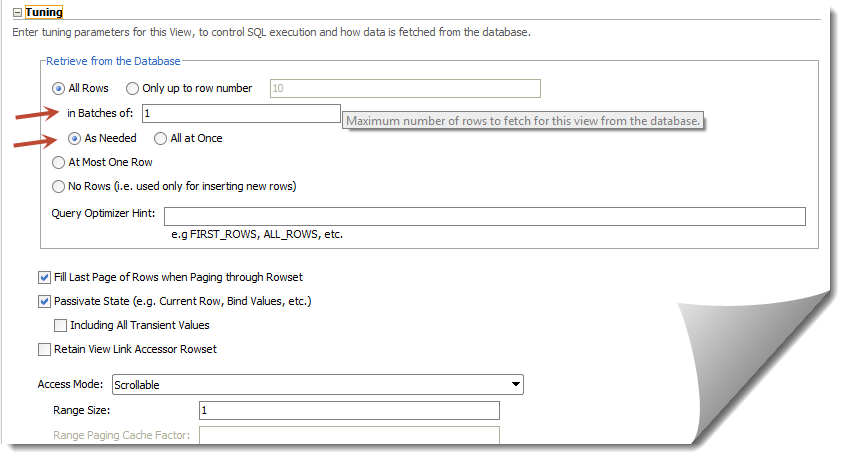
So the default settings look like this:


With the above settings it will fetch "All the rows" in batches of 1 ( "As Needed" ). This largely affects the table scrolling as queries gets fired "As Needed" in batches of 1.

For caching purposes we should have "All Rows" queried "All at Once" - this will ensure we get all results into our view with just one query. Be careful though with the number of records you have in table - you might land up in "OutOfMemory" exception :)


Note: You might also want to play around with "in batches of" parameter to regulate the number of queries fired.

Sunday, June 22, 2014

Global exception handler (oracle.adf.view.rich.context.ExceptionHandler) in ADF

By look of it how hard it can to simply register an exception handler to capture the "unhandled ones", well it took a hell lot of my time -  nearly a week spent to figure out what was that I was doing wrong. 


To give a context - I was trying to implement the global exception handler (adf_controller_exception_handler) by extending oracle.adf.view.rich.context.ExceptionHandler class and putting the fully qualified name of the implemented class in .adf/META-INF/services/oracle.adf.view.rich.context.ExceptionHandler.txt file.

I saw it working in local jDeveloper (Studio Edition Version 11.1.1.6.0) when deployed to integrated server it didn't work when deployed to dev. server. 


I banged my head a lot on this and was finally able solve it ! The issue was with the .adf/META-INF/services folder declaration - it seemed when deploying to server the exception handler was not getting registered. To debug the registered services you need to use the following.


  1.             
  2.           ServiceLoader compilers = ServiceLoader.load(ExceptionHandler.class);  
  3.             _logger.info(compilers.toString());  
  4.             for (ExceptionHandler compiler : compilers) {  
  5.                 _logger.info("******ExceptionHandler*********" + compiler);  
  6.             }  


If you check the loggers, the exception handler should be listed, if not then create a jar file with the exception handler class and the put the services folder along-with with the exception handler file (not a text file ) inside the META-INF of the jar file. Last step - put the jar file in WEB-INF/lib in your controller project.

ADF: navigation menu with go:Link


Oracle 11gThis post illustrates how a default navigation menu can be converted to use go link instead of command links. This will let users to use navigation tabs as simple links. Users can then be able to use browser basic functions as right click copy, share, open the link in new tab. The navigation itself will have simple go links which are also SEO friendly.


Implementation

Lets see how the current navigation model looks like:


1
2
3
4
5
<af:navigationPane hint="tabs" var="foo" value="#{xmlMenuModel} level="1">
  <f:facet name="nodeStamp">
    <af:commandNavigationItem text="#{foo.label}" action="#{foo.doAction}"/>
  </f:facet> 
</af:navigationPane>

Now we cannot simply have a goLink instead of a af:commandNavigationItem that is because af:navigationPane  supports only af:commandNavigationItem and if we keep using the commandNavigationItem then all the basic functions will not work. Also using a command navigation item makes an extra call before redirecting the user to requested page.

So do we have a workaround ? Yes ! and the end product will be like the following-


Things to consider, we need to get the dynamic URLs from default-navigation model and also we need to handle parameters that might be defined with the URL.

The following fragment code can be used instead of the standard pagemenudefinition task flow, of coarse you might want to create a TF out of it.


1
2
3
4
5
6
7
8
9
10
11
12
13
14
15
16
17
18
19
20
21
22
23
24
25
26
27
28
29
30
31
32
33
34
35
36
37
38
39
40
41
42
43
44
45
46
47
48
<?xml version='1.0' encoding='utf-8'?>
<jsp:root xmlns:jsp="http://java.sun.com/JSP/Page" xmlns:f="http://java.sun.com/jsf/core" xmlns:af="http://xmlns.oracle.com/adf/faces/rich" version="2.1">
 <af:panelGroupLayout id="s290" styleClass="WCMenuNav">
  <div style="height: 33px;margin-left:-9px">
   <af:panelGroupLayout id="pgm16" styleClass="af_navigationPane af_navigationPane-tabs">
    <af:panelGroupLayout id="pgm14" inlineStyle="height:33px" styleClass="af_navigationPane-tabs_header">
     <af:panelGroupLayout id="pgm153" styleClass="af_navigationPane-tabs_body">
      <af:panelGroupLayout id="pgm2e" styleClass="af_navigationPane-tabs_content">
       <af:iterator var="node" varStatus="vs" value="#{navigationContext.defaultNavigationModel.listModel['startNode=/, includeStartNode=false']}" id="itor1">
        <af:switcher id="afs" facetName="#{node.selected ? 'current':'others'}">
         <f:facet name="others">
          <af:panelGroupLayout id="pgm2" styleClass="af_navigationPane-tabs_tab">
           <af:panelGroupLayout id="pgm3" styleClass="af_navigationPane-tabs_tab-start" inlineStyle="height:33px"/>
           <af:panelGroupLayout id="pgm4" styleClass="af_navigationPane-tabs_tab-content" inlineStyle="height:33px">
            <af:goLink id="gLink" styleClass="af_navigationPane-tabs_tab-link tab_link" text="#{node.title}" destination="#{node.prettyUrl}?#{node.parameters}"/>
           </af:panelGroupLayout>
           <af:panelGroupLayout id="pgm5" styleClass="af_navigationPane-tabs_tab-end" inlineStyle="height:33px"/>
          </af:panelGroupLayout>
         </f:facet>
         <f:facet name="current">
          <af:panelGroupLayout id="pgo2" styleClass="af_navigationPane-tabs_tab p_AFDisabled p_AFSelected">
           <af:panelGroupLayout id="pgo3" styleClass="af_navigationPane-tabs_tab-start" inlineStyle="height:33px"/>
           <af:panelGroupLayout id="pgo4" styleClass="af_navigationPane-tabs_tab-content" inlineStyle="height:33px">
            <af:outputText id="gLinko" styleClass="af_navigationPane-tabs_tab-link" value="#{node.title}"/>
           </af:panelGroupLayout>
           <af:panelGroupLayout id="pgo5" styleClass="af_navigationPane-tabs_tab-end" inlineStyle="height:33px"/>
          </af:panelGroupLayout>
         </f:facet>
        </af:switcher>
       </af:iterator>
      </af:panelGroupLayout>
     </af:panelGroupLayout>
    </af:panelGroupLayout>
   </af:panelGroupLayout>
  </div>
 </af:panelGroupLayout>
 <f:verbatim>
<script type="text/javascript"> 
//script to add parameters to URL 
          $(".af_navigationPane-tabs_tab-link.tab_link.af_goLink").each(function () {  
            var newURL = this.href.split("%7B").join('').split("%7D").join('').split("%2C").join('').split("%20").join('&amp;amp;');  
            if (newURL.charAt(newURL.length - 1) == '?') {  
              newURL = newURL.substring(0, newURL.length - 1);  
            }  
            this.href = newURL;  
          });  
</script>
</jsp:root>

 Here we go, we not have a tabbed navigation which is much more like web 2.0 style.