Tuesday, June 24, 2014

ADF: Optimize Read-Only Queries (for caching)

Consider you have a list of items which you show to the user regularly, be it in a table or a listOfValues or even for processing. With default setting of the view object you would have to fire as many queries as you have in database ( Duh ! )

So the default settings look like this:
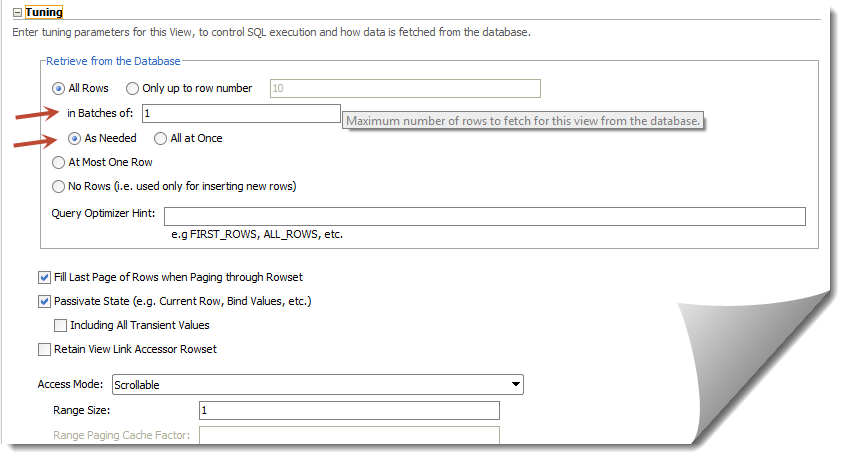


With the above settings it will fetch "All the rows" in batches of 1 ( "As Needed" ). This largely affects the table scrolling as queries gets fired "As Needed" in batches of 1.

For caching purposes we should have "All Rows" queried "All at Once" - this will ensure we get all results into our view with just one query. Be careful though with the number of records you have in table - you might land up in "OutOfMemory" exception :)


Note: You might also want to play around with "in batches of" parameter to regulate the number of queries fired.

Sunday, June 22, 2014

Global exception handler (oracle.adf.view.rich.context.ExceptionHandler) in ADF

By look of it how hard it can to simply register an exception handler to capture the "unhandled ones", well it took a hell lot of my time -  nearly a week spent to figure out what was that I was doing wrong. 


To give a context - I was trying to implement the global exception handler (adf_controller_exception_handler) by extending oracle.adf.view.rich.context.ExceptionHandler class and putting the fully qualified name of the implemented class in .adf/META-INF/services/oracle.adf.view.rich.context.ExceptionHandler.txt file.

I saw it working in local jDeveloper (Studio Edition Version 11.1.1.6.0) when deployed to integrated server it didn't work when deployed to dev. server. 


I banged my head a lot on this and was finally able solve it ! The issue was with the .adf/META-INF/services folder declaration - it seemed when deploying to server the exception handler was not getting registered. To debug the registered services you need to use the following.


  1.             
  2.           ServiceLoader compilers = ServiceLoader.load(ExceptionHandler.class);  
  3.             _logger.info(compilers.toString());  
  4.             for (ExceptionHandler compiler : compilers) {  
  5.                 _logger.info("******ExceptionHandler*********" + compiler);  
  6.             }  


If you check the loggers, the exception handler should be listed, if not then create a jar file with the exception handler class and the put the services folder along-with with the exception handler file (not a text file ) inside the META-INF of the jar file. Last step - put the jar file in WEB-INF/lib in your controller project.

Oracle Webcenter: Caching with read-only viewobjects


What are the read-only view objects used for?

– One of the most used trick to have up your sleeve when dealing with read only objects is to be able to cache it on view layer. 
– Avoid read only view objects for speed benefits alone - Older ADF manualsrecommended using read only view objects as there was a minor speed benefit. Since JDeveloper 11g thisis no longer true as the caching mechanism has been improved. Today read only view objects should bereserved for complex queries such as those with set operations (e.g. UNION, MINUS, INTERSECT)and connect by queries. All other view objects should be based on entity objects.


Being said that, we can use the in memory mode of retrieving the data for rows in af:table by using a large fetchSize. 

ADF: navigation menu with go:Link


Oracle 11gThis post illustrates how a default navigation menu can be converted to use go link instead of command links. This will let users to use navigation tabs as simple links. Users can then be able to use browser basic functions as right click copy, share, open the link in new tab. The navigation itself will have simple go links which are also SEO friendly.


Implementation

Lets see how the current navigation model looks like:


1
2
3
4
5
<af:navigationPane hint="tabs" var="foo" value="#{xmlMenuModel} level="1">
  <f:facet name="nodeStamp">
    <af:commandNavigationItem text="#{foo.label}" action="#{foo.doAction}"/>
  </f:facet> 
</af:navigationPane>

Now we cannot simply have a goLink instead of a af:commandNavigationItem that is because af:navigationPane  supports only af:commandNavigationItem and if we keep using the commandNavigationItem then all the basic functions will not work. Also using a command navigation item makes an extra call before redirecting the user to requested page.

So do we have a workaround ? Yes ! and the end product will be like the following-


Things to consider, we need to get the dynamic URLs from default-navigation model and also we need to handle parameters that might be defined with the URL.

The following fragment code can be used instead of the standard pagemenudefinition task flow, of coarse you might want to create a TF out of it.


1
2
3
4
5
6
7
8
9
10
11
12
13
14
15
16
17
18
19
20
21
22
23
24
25
26
27
28
29
30
31
32
33
34
35
36
37
38
39
40
41
42
43
44
45
46
47
48
<?xml version='1.0' encoding='utf-8'?>
<jsp:root xmlns:jsp="http://java.sun.com/JSP/Page" xmlns:f="http://java.sun.com/jsf/core" xmlns:af="http://xmlns.oracle.com/adf/faces/rich" version="2.1">
 <af:panelGroupLayout id="s290" styleClass="WCMenuNav">
  <div style="height: 33px;margin-left:-9px">
   <af:panelGroupLayout id="pgm16" styleClass="af_navigationPane af_navigationPane-tabs">
    <af:panelGroupLayout id="pgm14" inlineStyle="height:33px" styleClass="af_navigationPane-tabs_header">
     <af:panelGroupLayout id="pgm153" styleClass="af_navigationPane-tabs_body">
      <af:panelGroupLayout id="pgm2e" styleClass="af_navigationPane-tabs_content">
       <af:iterator var="node" varStatus="vs" value="#{navigationContext.defaultNavigationModel.listModel['startNode=/, includeStartNode=false']}" id="itor1">
        <af:switcher id="afs" facetName="#{node.selected ? 'current':'others'}">
         <f:facet name="others">
          <af:panelGroupLayout id="pgm2" styleClass="af_navigationPane-tabs_tab">
           <af:panelGroupLayout id="pgm3" styleClass="af_navigationPane-tabs_tab-start" inlineStyle="height:33px"/>
           <af:panelGroupLayout id="pgm4" styleClass="af_navigationPane-tabs_tab-content" inlineStyle="height:33px">
            <af:goLink id="gLink" styleClass="af_navigationPane-tabs_tab-link tab_link" text="#{node.title}" destination="#{node.prettyUrl}?#{node.parameters}"/>
           </af:panelGroupLayout>
           <af:panelGroupLayout id="pgm5" styleClass="af_navigationPane-tabs_tab-end" inlineStyle="height:33px"/>
          </af:panelGroupLayout>
         </f:facet>
         <f:facet name="current">
          <af:panelGroupLayout id="pgo2" styleClass="af_navigationPane-tabs_tab p_AFDisabled p_AFSelected">
           <af:panelGroupLayout id="pgo3" styleClass="af_navigationPane-tabs_tab-start" inlineStyle="height:33px"/>
           <af:panelGroupLayout id="pgo4" styleClass="af_navigationPane-tabs_tab-content" inlineStyle="height:33px">
            <af:outputText id="gLinko" styleClass="af_navigationPane-tabs_tab-link" value="#{node.title}"/>
           </af:panelGroupLayout>
           <af:panelGroupLayout id="pgo5" styleClass="af_navigationPane-tabs_tab-end" inlineStyle="height:33px"/>
          </af:panelGroupLayout>
         </f:facet>
        </af:switcher>
       </af:iterator>
      </af:panelGroupLayout>
     </af:panelGroupLayout>
    </af:panelGroupLayout>
   </af:panelGroupLayout>
  </div>
 </af:panelGroupLayout>
 <f:verbatim>
<script type="text/javascript"> 
//script to add parameters to URL 
          $(".af_navigationPane-tabs_tab-link.tab_link.af_goLink").each(function () {  
            var newURL = this.href.split("%7B").join('').split("%7D").join('').split("%2C").join('').split("%20").join('&amp;amp;');  
            if (newURL.charAt(newURL.length - 1) == '?') {  
              newURL = newURL.substring(0, newURL.length - 1);  
            }  
            this.href = newURL;  
          });  
</script>
</jsp:root>

 Here we go, we not have a tabbed navigation which is much more like web 2.0 style.