Wednesday, June 25, 2014

Blogger: "don't track your own pageviews" issue


Why am I getting this freaking error? Surely, Google can do better than this.


Here is some trace to help solve the issue

Network Trace:


  1. Request URL:
    https://www.abhinandanpanda.com/b/statsBlockingCookie?action=TEST&callback=__gwt_jsonp__.P1.onSuccess
  2. Request Headers CAUTION: Provisional headers are shown.
    1. Accept:
      */*
    2. Cache-Control:
      no-cache
    3. Pragma:
      no-cache
    4. Referer:
      https://www.blogger.com/blogger.g?blogID=7960247454552015802
    5. User-Agent:
      Mozilla/5.0 (Windows NT 6.1; WOW64) AppleWebKit/537.36 (KHTML, like Gecko) Chrome/35.0.1916.153 Safari/537.36
  3. Query String Parametersview sourceview URL encoded
    1. action:
      TEST
    2. callback:
      __gwt_jsonp__.P1.onSuccess

Top adf code snippets for common tasks

Hello there!  Today let’s see the top commonly used ADF snippets (at least that’s what I thought while starting to share itso here you go with the entries.


1.      Getting the page bindings


This is commonly used to get the page bindings in the managed bean to get either specific binding values or get a hold on the action for the binding.

1:    public static BindingContainer getBindingContainer() {  
2:      FacesContext facesContext = FacesContext.getCurrentInstance();  
3:      Application app = facesContext.getApplication();  
4:      ExpressionFactory elFactory = app.getExpressionFactory();  
5:      ELContext elContext = facesContext.getELContext();  
6:      ValueExpression valueExp = elFactory.createValueExpression(elContext, "#{bindings}", Object.class);  
7:      return (BindingContainer)valueExp.getValue(elContext);  
8:    }  

2.     Getting hold off the Application Module


Application modules are required to do any sort of tasks binding the view object and the view links and all wrapped around by services. So needless to say that whenever there is a need to call your service getting to your AM is your first step.


1:    public static ApplicationModule getApplicationModuleForDataControl(String name) {  
2:      BindingContext bindingContext = BindingContext.getCurrent();  
3:      ApplicationModule appModule = null;  
4:      if (null != bindingContext) {  
5:        DCDataControl dc = bindingContext.findDataControl(name);  
6:        if (dc != null) {  
7:          appModule = (ApplicationModule)dc.getDataProvider();  
8:        }  
9:      }  
10:      return appModule;  
11:    }  


3.     Resource Bundle Properties


     There are scenarios where we want to get the property values from the resource bundle in our beans and this happens more often than you think!

1:    public static String getResourceProperty(String label, Locale userLocale) {  
2:      String bundle_name = "com.example.mybundle";  
3:      String txt = null;  
4:      try {  
5:        ResourceBundle bundle = BundleFactory.getBundle(bundle_name, userLocale);  
6:        if (bundle != null) {  
7:          txt = bundle.getString(label);  
8:        }  
9:      } catch (Exception e) {  
10:        logger.severe("Problem in loading resource bundle: " + bundle_name, e.getMessage());  
11:      }  
12:      return txt;  
13:    }  

4.     Is the request a PPR?


     Ever wondered if a request is a normal full request or a partial page request, well the following snippet gives you that information. This is a very useful thing to know when you try to filter out requests in your listeners.

1:    public static boolean isPprRequest() {  
2:      FacesContext facesContext = FacesContext.getCurrentInstance();  
3:      return AdfFacesContext.getCurrentInstance().isPartialRequest(facesContext);  
4:    }  

5.     Retrieving the request headers from within managed bean


     We can get the request headers from the bean using the following snippet


1:  FacesContext facesContext = FacesContext.getCurrentInstance();  
2:  ExternalContext externalContext = facesContext.getExternalContext();  
3:  Map requestHeaderMap = externalContext.getRequestHeaderMap();  


6.     Accessing request and response objects from a bean


1:  FacesContext facesContext = FacesContext.getCurrentInstance();  
2:  ExternalContext externalContext = facesContext.getExternalContext();  
3:  HttpServletResponse response = (HttpServletResponse)externalContext.getResponse();  
4:  HttpServletRequest request = (HttpServletRequest)facesContext.getExternalContext().getRequest(); 


7.     Putting and retrieving from session scope


     Quick ways to manage objects in session scope.


1:  ADFContext.getCurrent().getSessionScope().put("abc", abcValue);  
2:  ADFContext.getCurrent().getSessionScope().remove("abc");  
3:  ADFContext.getCurrent().getSessionScope().get("abc");  

8.     Adding partial targets at runtime


     We could add partial targets to components at runtime so that the property changes made in a bean method to a previously non target component reflects in UI.

1:  AdfFacesContext.getCurrentInstance().addPartialTarget(myComponent); 


9.     Adding JavaScript to response


     More often than not we might be required to trigger some external Javascript on click of a button. To achieve it we use the following code.

1:    public static void addScriptOnPartialRequest(String script) {  
2:      logger.fine("Adding Java Script " + script);  
3:      FacesContext context = FacesContext.getCurrentInstance();  
4:      if (AdfFacesContext.getCurrentInstance().isPartialRequest(context)) {  
5:        ExtendedRenderKitService erks = Service.getRenderKitService(context, ExtendedRenderKitService.class);  
6:        erks.addScript(context, script);  
7:      }  
8:    }  


10. Get the current Locale


     Snippet to get the current locale


1:  public static Locale getLocale() {  
2:  ADFContext adfctx = ADFContext.getCurrent();  
3:  return adfctx.getLocale();  
4:  }  


Tuesday, June 24, 2014

ADF : Handling browser back button

One of the most annoying side effects of doing a PPR request or matter of fact an AJAX request is the inability of the user to go back to previous transaction using browser back button. This is a common pitfall and there are number of ways to deal with it.


Case Study:
Lets assume we have 3 page fragments (jsff) in a bounded task flow and "main.jspx" where task flow is imported and a "launch.jspx" from which we trigger the new page with TF. When the user goes from step 1 to step 3 through step 2 and does a back button, the user is redirected to "launch.jspx" instead of "main.jspx" ( step 2)


Ways to handle browser back button

  1. Simplest - Avoid using bounded task flow ( Not recommended ) -  Now ! this may sound as a non - solution and to most part of it is correct ! but for specific user stories it could make sense. For example, in the above scenario we could use 3 different task flows for each of the fragments and use af:goLinks to navigate from one page to the other by keeping the data in session. This could be a solution when reusing task flow is not really a concern.
  2. Using session variable and servlet filter - We create a bounded task flow with session variable (currentStep = 0) as the input to each step, this is to track the user's current step. 
    • If the user is in step 3 then we set currentStep = 3 and set the value in session. 
    • When the user clicks on back button we check if the request is coming from "launch.jspx" and the currentStep != 0 then go to "main.jspx" with currentStep = currentStep  - 1
    • Once we have the Task Flow triggered through "main.jspx" - we check the value of currentStep  and show the user the requested fragment
  3. Using session variable and PagePhaseListener  ( Recommended )- We follow the same steps as above but instead of a filter we use a PagePhaseListener  to capture the back button request to "launch.jspx".
  4. There is an excellent article on "How To Handle Web Browser Buttons in ADF/WebCenter Applications" by Andrejus who provides an additional approach.

Preventing request caching on browser back button

One more catch with the above implementation logic is to get the request to come to server when user clicks on back button as browser tend to cache the resources.

To prevent it browser caching:


package com.example;  
 import javax.faces.context.FacesContext;  
 import javax.faces.event.PhaseEvent;  
 import javax.faces.event.PhaseId;  
 import javax.faces.event.PhaseListener;  
 import javax.servlet.http.HttpServletResponse;  
 public class PagePhasehaseListener implements PhaseListener  
 {  
   public PhaseId getPhaseId()  
   {  
     return PhaseId.RENDER_RESPONSE;  
   }  
   public void afterPhase(PhaseEvent event)  
   {  
   }  
   public void beforePhase(PhaseEvent event)  
   {  
     FacesContext facesContext = event.getFacesContext();  
     HttpServletResponse response = (HttpServletResponse) facesContext  
         .getExternalContext().getResponse();  
     response.addHeader("Pragma", "no-cache");  
     response.addHeader("Expires", "Wed, 1 Dec 2012 01:00:00 GMT");  
     response.addHeader("Cache-Control", "no-cache");  
     response.addHeader("Cache-Control", "no-store");  
     response.addHeader("Cache-Control", "must-revalidate");  
   }  
 }  

ADF: Optimize Read-Only Queries (for caching)

Consider you have a list of items which you show to the user regularly, be it in a table or a listOfValues or even for processing. With default setting of the view object you would have to fire as many queries as you have in database ( Duh ! )

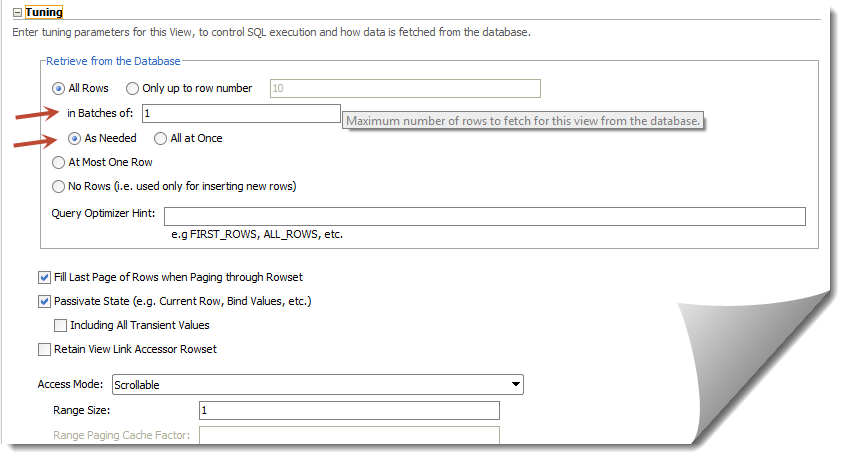
So the default settings look like this:


With the above settings it will fetch "All the rows" in batches of 1 ( "As Needed" ). This largely affects the table scrolling as queries gets fired "As Needed" in batches of 1.

For caching purposes we should have "All Rows" queried "All at Once" - this will ensure we get all results into our view with just one query. Be careful though with the number of records you have in table - you might land up in "OutOfMemory" exception :)


Note: You might also want to play around with "in batches of" parameter to regulate the number of queries fired.

Sunday, June 22, 2014

Global exception handler (oracle.adf.view.rich.context.ExceptionHandler) in ADF

By look of it how hard it can to simply register an exception handler to capture the "unhandled ones", well it took a hell lot of my time -  nearly a week spent to figure out what was that I was doing wrong. 


To give a context - I was trying to implement the global exception handler (adf_controller_exception_handler) by extending oracle.adf.view.rich.context.ExceptionHandler class and putting the fully qualified name of the implemented class in .adf/META-INF/services/oracle.adf.view.rich.context.ExceptionHandler.txt file.

I saw it working in local jDeveloper (Studio Edition Version 11.1.1.6.0) when deployed to integrated server it didn't work when deployed to dev. server. 


I banged my head a lot on this and was finally able solve it ! The issue was with the .adf/META-INF/services folder declaration - it seemed when deploying to server the exception handler was not getting registered. To debug the registered services you need to use the following.


  1.             
  2.           ServiceLoader compilers = ServiceLoader.load(ExceptionHandler.class);  
  3.             _logger.info(compilers.toString());  
  4.             for (ExceptionHandler compiler : compilers) {  
  5.                 _logger.info("******ExceptionHandler*********" + compiler);  
  6.             }  


If you check the loggers, the exception handler should be listed, if not then create a jar file with the exception handler class and the put the services folder along-with with the exception handler file (not a text file ) inside the META-INF of the jar file. Last step - put the jar file in WEB-INF/lib in your controller project.

Oracle Webcenter: Caching with read-only viewobjects


What are the read-only view objects used for?

– One of the most used trick to have up your sleeve when dealing with read only objects is to be able to cache it on view layer. 
– Avoid read only view objects for speed benefits alone - Older ADF manualsrecommended using read only view objects as there was a minor speed benefit. Since JDeveloper 11g thisis no longer true as the caching mechanism has been improved. Today read only view objects should bereserved for complex queries such as those with set operations (e.g. UNION, MINUS, INTERSECT)and connect by queries. All other view objects should be based on entity objects.


Being said that, we can use the in memory mode of retrieving the data for rows in af:table by using a large fetchSize. 

ADF: navigation menu with go:Link


Oracle 11gThis post illustrates how a default navigation menu can be converted to use go link instead of command links. This will let users to use navigation tabs as simple links. Users can then be able to use browser basic functions as right click copy, share, open the link in new tab. The navigation itself will have simple go links which are also SEO friendly.


Implementation

Lets see how the current navigation model looks like:


1
2
3
4
5
<af:navigationPane hint="tabs" var="foo" value="#{xmlMenuModel} level="1">
  <f:facet name="nodeStamp">
    <af:commandNavigationItem text="#{foo.label}" action="#{foo.doAction}"/>
  </f:facet> 
</af:navigationPane>

Now we cannot simply have a goLink instead of a af:commandNavigationItem that is because af:navigationPane  supports only af:commandNavigationItem and if we keep using the commandNavigationItem then all the basic functions will not work. Also using a command navigation item makes an extra call before redirecting the user to requested page.

So do we have a workaround ? Yes ! and the end product will be like the following-


Things to consider, we need to get the dynamic URLs from default-navigation model and also we need to handle parameters that might be defined with the URL.

The following fragment code can be used instead of the standard pagemenudefinition task flow, of coarse you might want to create a TF out of it.


1
2
3
4
5
6
7
8
9
10
11
12
13
14
15
16
17
18
19
20
21
22
23
24
25
26
27
28
29
30
31
32
33
34
35
36
37
38
39
40
41
42
43
44
45
46
47
48
<?xml version='1.0' encoding='utf-8'?>
<jsp:root xmlns:jsp="http://java.sun.com/JSP/Page" xmlns:f="http://java.sun.com/jsf/core" xmlns:af="http://xmlns.oracle.com/adf/faces/rich" version="2.1">
 <af:panelGroupLayout id="s290" styleClass="WCMenuNav">
  <div style="height: 33px;margin-left:-9px">
   <af:panelGroupLayout id="pgm16" styleClass="af_navigationPane af_navigationPane-tabs">
    <af:panelGroupLayout id="pgm14" inlineStyle="height:33px" styleClass="af_navigationPane-tabs_header">
     <af:panelGroupLayout id="pgm153" styleClass="af_navigationPane-tabs_body">
      <af:panelGroupLayout id="pgm2e" styleClass="af_navigationPane-tabs_content">
       <af:iterator var="node" varStatus="vs" value="#{navigationContext.defaultNavigationModel.listModel['startNode=/, includeStartNode=false']}" id="itor1">
        <af:switcher id="afs" facetName="#{node.selected ? 'current':'others'}">
         <f:facet name="others">
          <af:panelGroupLayout id="pgm2" styleClass="af_navigationPane-tabs_tab">
           <af:panelGroupLayout id="pgm3" styleClass="af_navigationPane-tabs_tab-start" inlineStyle="height:33px"/>
           <af:panelGroupLayout id="pgm4" styleClass="af_navigationPane-tabs_tab-content" inlineStyle="height:33px">
            <af:goLink id="gLink" styleClass="af_navigationPane-tabs_tab-link tab_link" text="#{node.title}" destination="#{node.prettyUrl}?#{node.parameters}"/>
           </af:panelGroupLayout>
           <af:panelGroupLayout id="pgm5" styleClass="af_navigationPane-tabs_tab-end" inlineStyle="height:33px"/>
          </af:panelGroupLayout>
         </f:facet>
         <f:facet name="current">
          <af:panelGroupLayout id="pgo2" styleClass="af_navigationPane-tabs_tab p_AFDisabled p_AFSelected">
           <af:panelGroupLayout id="pgo3" styleClass="af_navigationPane-tabs_tab-start" inlineStyle="height:33px"/>
           <af:panelGroupLayout id="pgo4" styleClass="af_navigationPane-tabs_tab-content" inlineStyle="height:33px">
            <af:outputText id="gLinko" styleClass="af_navigationPane-tabs_tab-link" value="#{node.title}"/>
           </af:panelGroupLayout>
           <af:panelGroupLayout id="pgo5" styleClass="af_navigationPane-tabs_tab-end" inlineStyle="height:33px"/>
          </af:panelGroupLayout>
         </f:facet>
        </af:switcher>
       </af:iterator>
      </af:panelGroupLayout>
     </af:panelGroupLayout>
    </af:panelGroupLayout>
   </af:panelGroupLayout>
  </div>
 </af:panelGroupLayout>
 <f:verbatim>
<script type="text/javascript"> 
//script to add parameters to URL 
          $(".af_navigationPane-tabs_tab-link.tab_link.af_goLink").each(function () {  
            var newURL = this.href.split("%7B").join('').split("%7D").join('').split("%2C").join('').split("%20").join('&amp;amp;');  
            if (newURL.charAt(newURL.length - 1) == '?') {  
              newURL = newURL.substring(0, newURL.length - 1);  
            }  
            this.href = newURL;  
          });  
</script>
</jsp:root>

 Here we go, we not have a tabbed navigation which is much more like web 2.0 style.